Module Management
Introduction
The CodexShaper Framework provides an intuitive way to manage various modules in WordPress. Users can enable or disable specific functionalities to customize their website as needed.
Accessing Module Settings
Go to CodexShaper Framework >> Settings
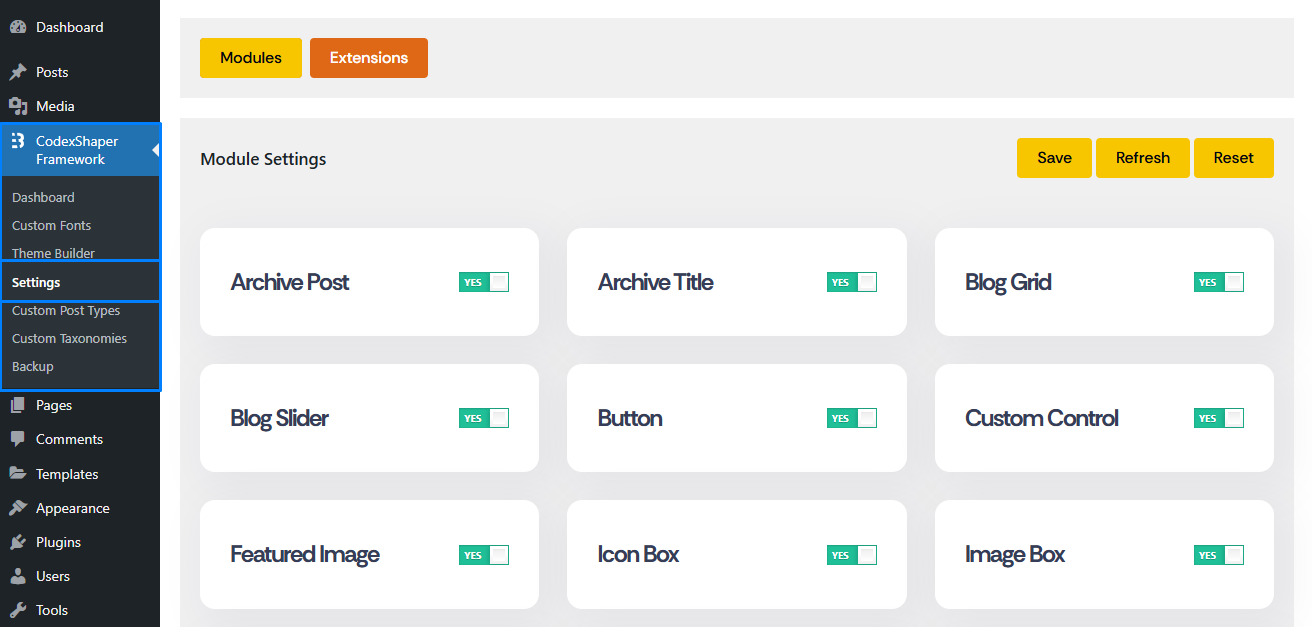
Managing Modules
Enabling or Disabling Each Modules
- Each module has a toggle switch with
YES/NOoptions. - To enable a module, switch it to
YES. - To disable a module, switch it to
NO.
Action Buttons
At the top-right corner, you will find three buttons:
Save: Saves the current module settings.Refresh: Reloads the module settings panel.Reset: Restores the default settings.
Notes
- Some modules may depend on others; ensure all dependencies are enabled.
- After disabling a module, its related features will no longer be available on the site.